Using Review Tables
Learn how to create review tables to compare agreements, extract key information, or summarize trends at scale.
Last updated: Jul 1, 2026
Overview
Review tables allow you to analyze many documents at once and output that analysis into a consistent, structured table view.
This guide walks you through creating and organizing a review table, assigning reviews, and and asking follow-up questions using Assistant.
Video Overview
Creating and Editing a Review Table (May 2026)
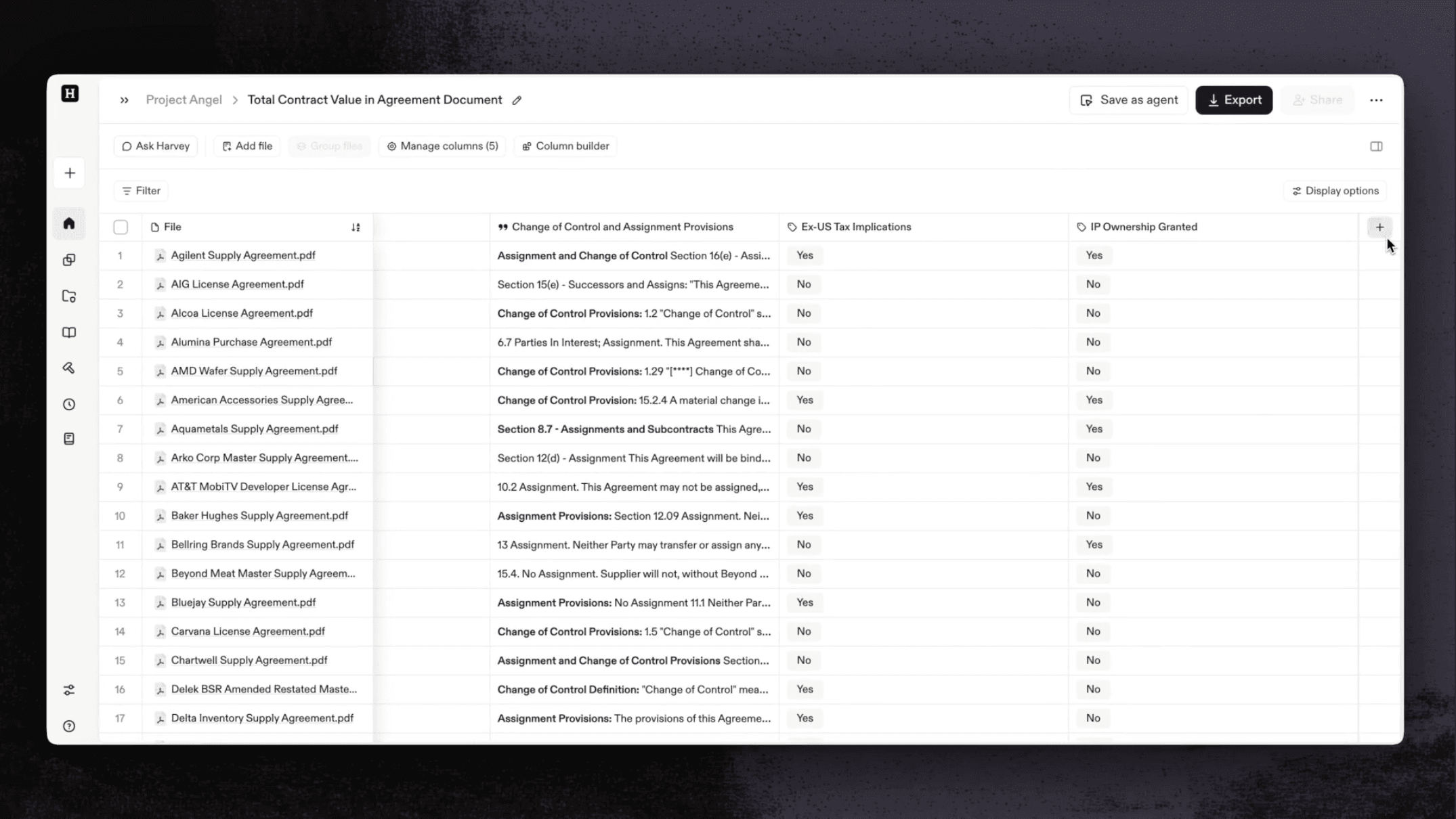
Creating a Review Table
You can create a review table from the Create button, from Assistant, or directly within a vault.
- Click Create in the sidebar menu.
- Select Review table.
Create From Assistant
- From Assistant, click the Create Review Table above the text box.
Create From a Vault
- Open a vault or create a new one.
- Click Create Review Table above the query text box.
- Select the files you want to include.
- Click Create table.
Tip: You can add up to 10,000 Vault files to a review table. If you're working with a high volume of files, adding them to a Vault first is the best approach, since direct uploads from your computer are limited to 50 files.
Building Your Review Table
Add columns to begin analyzing your files. Each column contains a prompt that will run across all files, and you can create these yourself or use the Column Builder to generate suggestions.
Set Table Instructions
Table Instructions let you define a single set of rules that automatically apply to every new column you generate in the table. Set them once at creation or update them any time to keep outputs consistent across the entire table without repeating instructions in each column prompt.
Example Use Cases
To add instructions when creating a table:
- Create a new review table.
- Click Table Settings at the top of the review table.
- In the Instructions field, describe how you want every cell response to behave — for example, how to refer to parties, how to handle redactions, or what reasoning framework to apply.
- Click Save. All new columns generated in this table will follow your instructions automatically.
To view or edit instructions after creation:
- Click Table Settings at the top of the table.
- Update the Instructions field as needed.
- Click Save.
Note: Updated instructions apply to all newly generated columns. Previously generated cells are not affected.
Set Default Language and Formatting

Table Settings let you define default language and formatting options that apply automatically to each new column you generate.
- Open a review table.
- Select Table Settings at the top of the table
- In the lower section of the settings, select the default language and format (Date, Currency, or Number) for each applicable column.
- Select Save. These formatting options will become the defaults for new columns.
Generate Columns with the Column Builder
- Click Column builder.
- In the text box, describe each piece of information you want Harvey to extract, and from which types of documents.
- Click Generate columns.
- Review the suggested columns and edit or remove any you don’t need.
- Type — how the output displays in the table.
- Label — the column name.
- Query — the prompt each column runs across your files.
- Click Add columns to apply them to the table.
- After results populate, open Manage Columns to make further adjustments.
Tip: When adding or editing a column, press the expand arrow in the top-right of the column popover to open a bigger prompt window with more room to write.
Attach a File as Column Context
If your column needs to reference a fixed document, like a playbook, regulatory framework, or standard form, attach a file as column context. Harvey automatically applies the file as context for every row.

To attach a file to a column:
- In your review table, select + Add Column to add a new column. To edit an existing column, select that column’s header.
- Select Attach file. Note that the file must come from the same source as your rows, either from Vault or from your computer.
- [Optional] In the column prompt, @ mention the file by name to direct how Harvey should use it. For example, "Compare against the relevant clause in @Privacy Policy" or "Identify deviations from @Standard Offer Letter."
- Select Continue to run the column.
- Review the results. You can click on a cell’s sources or open the document previewer to see how the column’s reference file contributed to a cell’s answer.
Note: Using a file as column context requires access to that file's source. For example, if a column references a file from Vault A, anyone using the agent needs at least view access to Vault A.
Sample Use Cases
Add a Manual Input Column For Notes
Manual Input Columns let you add your own notes and context directly to a review table alongside extracted document data, so you can analyze, flag, and query both without exporting to a spreadsheet.
Use them to capture insights that cannot be extracted from documents, such as internal context, reviewer judgment, or deal-specific nuances.
- In a review table, select +Add column in the column header area.
- Select Add manual input column.
- Enter a column name that reflects the type of information you want to capture.
- Select a column type:
- Free Response: Type your notes, comments or open-ended text into each cell.
- Classify: Define a set of classification labels for each document.
- Select Add column.
- Double click into the column’s cells to in-line edit to add text or add classification options.
Note: Since manual inputs are user-generated, they won’t appear in source citations or verification trails.
Organize Your Table
When information is spread across documents that need simultaneous review, such as multiple amendments, you can group them into a single row. Each column query will run across the grouped files, then display a single output for the row.
- Select files from your table that you want to group together, up to 25 files per group.
- Click Group from the black toolbar options.
You will now see each file group in its own row on your review table.
Tip: Hover over a group to preview which documents are contained.
Watch the video below to see how files are grouped, analyzed, and reviewed.
Adjust Table Views
Use Display options to control how information appears in the table, assign rows efficiently, and navigate large file sets.
- Wrap text to make long outputs easier to read.
- Adjust row assignment visibility when collaborating.
Folder Views
Switch between two display modes in your review table:
- Grouped by folders — Quickly scan files within their folder structure.
- Flat list — View all files at once without navigating through folders.
Move files into new or existing folders directly from the table, allowing you to reorganize content without switching views.
Review and Verify Outputs
Vault's review features help teams ensure data accuracy and streamline collaboration when working with extracted table data.
Bulk Verify or Unverify Rows
Verify or clear verification on multiple rows at once instead of working cell by cell.
- Select the rows you want to update.
- Hover over Table in the black toolbar at the bottom of the screen.
- Select Verify or Unverify.
The verification status updates for every selected row. You can re-run this any time to adjust status as your review progresses.
Learn more: How to Edit, Verify, and Track Activity in Review Table Cells
Ask Questions Over a Review Table
Create an Assistant thread directly inside any review table to run targeted questions over extracted data.* Harvey will respond and cite cells from the table in its answer. You can export the results or continue the thread with follow-up questions—just like any Assistant query.
You can ask Harvey to:
- Identify key dates, parties, or terms across contracts.
- Surface patterns in negotiation histories.
- Summarize insights across agreements (for example, “Summarize the most recent agreements involving cloud service companies.”)
*Assistant queries run over outputs in the review table, not the files uploaded. That is to say, you can start a thread to ask Harvey about the extracted data from your files, but not to review the files and extract new information. To achieve the latter, add or edit a table column and run the query through your files. Or, select the files from the first column and click Open in Assistant.
Steps to Start a Thread
- Open a review table.
- Enter your question in the Assistant text box. Harvey cites relevant table cells so you can verify the underlying data. You can export results or continue the conversation.
Note: Editing or filtering the table using the thread is not currently supported.
Use a Review Table as a Source
Reuse data you’ve already pulled into a review table when starting new work in Harvey.
Instead of exporting and importing your review table as a spreadsheet, you can select the review table directly in Assistant and use it to answer questions, draft documents, or complete workflows.
You can also combine a review table with other sources, like uploaded files or Web search, to stay in one continuous workflow.
Note: The review table source only contains the extracted data from table itself, not the files within. To include those files in your query, please select those files as an additional source.
Select a Review Table in Assistant
- In the prompt text box, select Files.
- Select Add review table.
- Select up to one review table.
- Click Add.
- Write your prompt and add up to two more sources of context.
Note: You can select review tables that you own (private) and review tables that are explicitly shared with you. Review tables that are shared to the entire workspace are not shown.
Add Sources to Your Review Table Query
- Create or open a review table.
- Open Ask Harvey.
- Add files or sources.
- Prompt Harvey. Ask questions referencing the new sources in addition to the review table data.
Export a Table
You can export your table to a spreadsheet by following the steps below.
- Select Export from your review table
- [Optional] Toggle on Highlight flagged cells to include cells flagged for review. Colored flags will be preserved.
Tips for Success
- Start with a small sample set to refine columns before scaling to a full document set.
- Use consistent column labels so collaborators can navigate the table easily.
- Group related files into folders before creating the table to simplify review workflows.
- Use the Column Builder or Magic Prompt in Assistant when you’re unsure how to phrase extraction queries.
- If one cell's answer looks off-target, you can re-run the individual cell’s answer instead of regenerating the whole column, leaving the rest of your table untouched.